Fix "network problem" In Open Web UI (websockets requirement)

If you have recently updated your Openwebui to a version 5.0 or newer, you may be faced with a strange error when interfacing with LLMs and Ollama.

In the UI you can see all installed models, and choose them, but when querying a model the return response is Network Problem. Like me you may have enabled DEBUG logging in the the openwebui Docker container. This also doesn't directly reveal the culprit. However if you look at your browser's Developer Tools you mat then see what the problem is. Websocket error.
Websocket support became mandatory in Openwebui v5.0+ is you look at the changelog, and if you are behind a reverse proxy like Nginx Proxy Manager, or Cloudflare Tunnels, you may not have a configuration setup for websockets. Luckily there are some choices in resolving this issue.
- Downgrade to a previous version of openwebui
- Disable websocket support in openwebui
- Add the proper support configuration to you Proxy setup
My configuration that was generating this error response was behind a Cloudflare Tunnel, so I updated the docker configuration to disable websockets as in order to enable proper websocket support currently in CF Tunnels, you need to make custom application configurations in Clooudflare for each of your accessing applications ie. Chrome, Firefox, Safari, etc. Disabling websockets in the openwebui Docker container requires passing an environment variable.
--env ENABLE_WEBSOCKET_SUPPORT=0
The addition of this to your Docker run command should get your setup working regardless of your proxy configuration, assuming the issue is websocket support
If you are running Apache with mod_proxy you may be able to use this config
ProxyPassReverse / http://127.0.0.1:8080/
<Location />
    ProxyPass ws://localhost:8080/
    ProxyPassReverse ws://localhost:8080/
</Location>```
If you use Nginx Proxy Manager, you can enable websocket support in the Proxy Host Configuration for your host
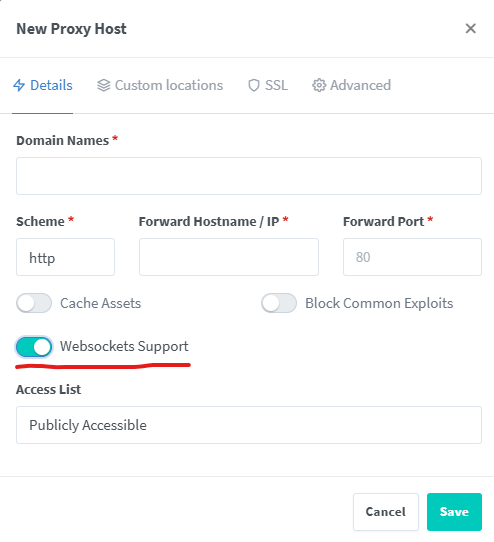
Though, you may also need to click on the advanced tab, and additionally add a custom NGINX configuration, depending on your setup.
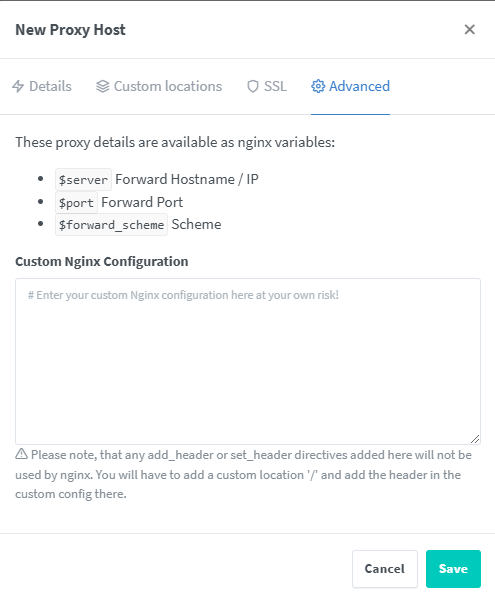
This is an example config
        proxy_http_version 1.1;
        proxy_set_header Upgrade $http_upgrade;
        proxy_set_header Connection "upgrade";```
If you are still having issues with this, there is a github topic on this issue.
 open-webui